
How to Add a Contact to Multiple Opportunities
You may want to add a contact to multiple opportunities. Follow these steps to learn how to allow duplicate opportunities. After that is done, there are two ways to add them: you can add an opportunity in the individual contact's profile, or use the Opportunity Trigger Action.
Step 1: How to Allow Duplicate Opportunities in Settings
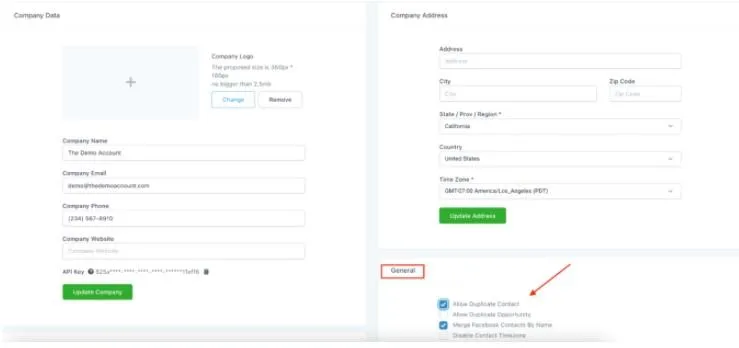
Under Settings > Business Info, navigate to "General"
Check the box for "Allow Duplicate Opportunity."
Step 2: How to Add Opportunities in the Contact profile.
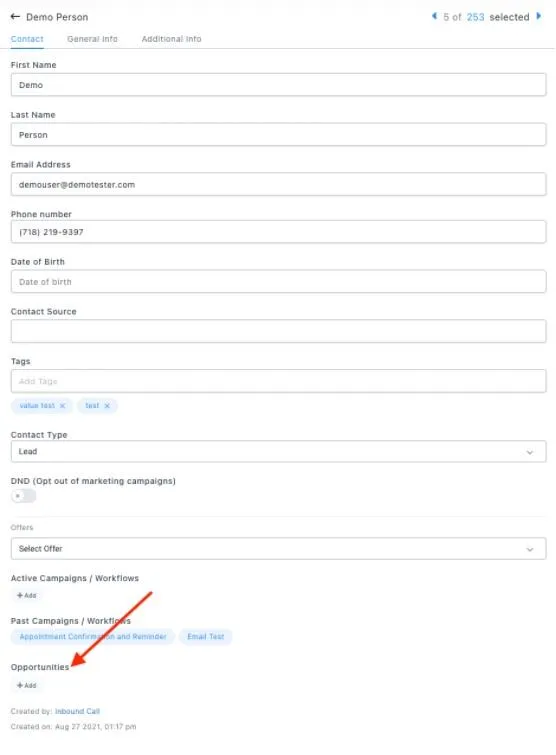
Click into the contact profile.
Scroll down to the left side where you see "Opportunities". Here, you can place them in however many you'd like.
Conversations
Reporting
If you have any suggestions for an automation or questions you can send an email to [email protected]